
Notebooks
Turn the way you already work into an AI workflow your whole team can run.
Capture how you do a piece of work as plain-language steps, and let Normain carry it out across your documents, from the first file to a finished, sourced deliverable.
Build a Notebook once, then reuse it: next engagement, same method, new files.
What a Notebook is
A Notebook is a way to capture your expertise in an end-to-end AI workflow. You describe each step of your method in plain language, the way you would brief a colleague, together with the files it should work on, and Normain carries it out across your documents, from the first file to a finished, sourced deliverable.
Each step runs on its own virtual machine, a real computer of its own. That is what lets Normain do the work rather than just describe it: it opens your real files, works across hundreds at once, checks itself before answering, and writes the result straight into your own template or leaves its edits as suggestions you approve or reject. Every step shows its reasoning, confidence score and the citations behind every answer.
The hardest thing to scale is expertise. A Notebook captures how your best people work, and turns it into end-to-end AI workflows anyone on the team can use. The people who know the work best build the AI that performs it, and your best thinking reaches every engagement instead of staying with a few senior people.
The steps in a Notebook
Each step is one of a few types, and you can chain as many as the work needs:
- Agent step - you describe the work and an agent carries it out, able to take on pretty much any analysis, from checking documents against a standard to pulling key terms or summarising findings. This is what most steps are.
- Input step - a point where someone adds the files or details Normain needs before the Notebook continues.
- Note step - guidance you write for whoever runs the Notebook; it holds a place in the sequence without running.
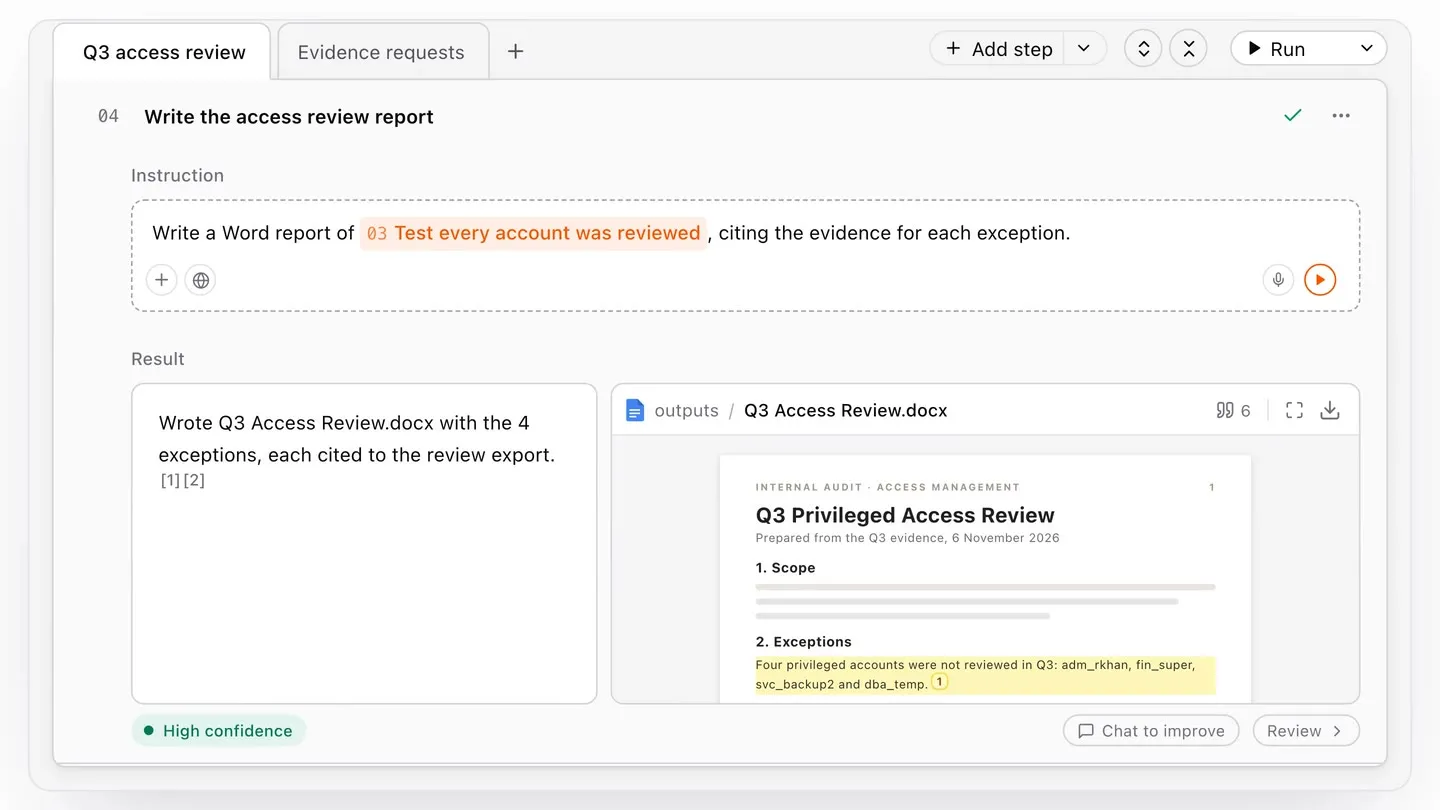
- Deliverable step - produces the finished document, built on your own template or from scratch, in whatever format your work needs, such as Word, PowerPoint, Excel, a web page, and more.
- Extraction step (coming soon) - an analysis that takes the shape of an Extraction, whether Simple, Repeat, or Spreadsheet.
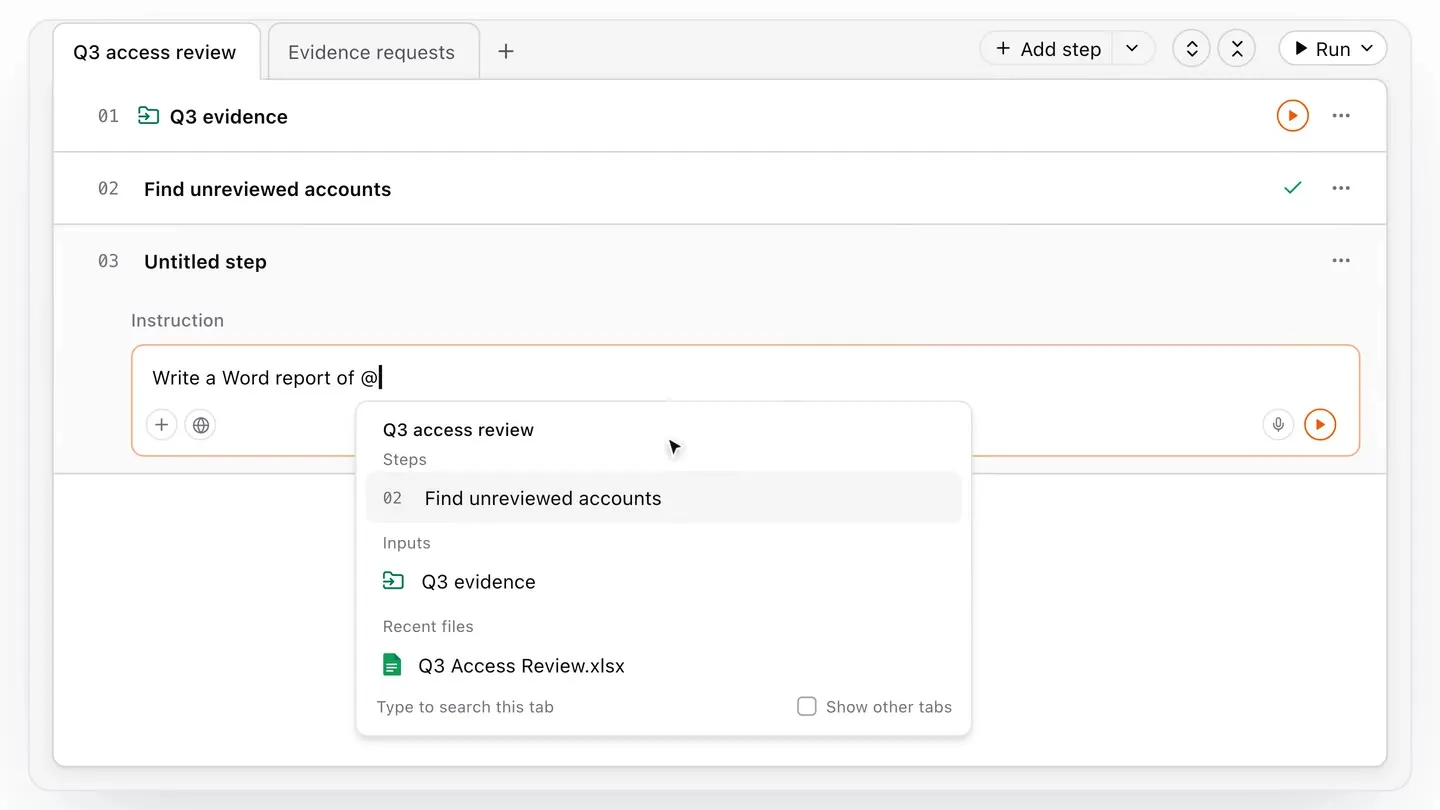
A step can build on any earlier step, from any tab of the Notebook. Add the step
you want to your instruction with the @ button.
Deliverables
A deliverable is the finished document a Notebook produces as its last step, built on your own template or from scratch, in whatever format your work needs, such as Word, PowerPoint, Excel, a web page, and more.
You add a deliverable step, describe what you want in plain language, and Normain produces it based on the results of the earlier steps, either straight into your template or as suggested edits and comments you approve or reject. Every figure and sentence keeps its citation, and the file you hand over traces back to its source. See Deliverables for the full detail.
Sources and citations
Every answer in a Notebook is tied to where it came from. Open any result and the Trust Panel walks you from the answer to the source document, the exact page or cell, and the passage it used, with Normain’s reasoning and a confidence indicator alongside. Normain checks its own work before you see it, and drops anything it cannot support.
Citations carry through: when a step produces a Word, PowerPoint or PDF file, the sources travel into the finished document, so a reviewer can click a line and see where it came from.
Running and refreshing
- Run the Notebook - runs every step in order, from the first to the last.
- Run one step - runs a single step on its own. Use this while you iterate on a step, or to refresh it after you have changed an earlier one.
When a source or an earlier step changes, Normain flags the steps that depend on it, so you can refresh just those rather than redoing the whole Notebook.
Every run is kept in the step’s history, so you can compare versions and roll back at any time. No work is lost when you iterate.
Build it with chat
You do not have to start from a blank page. Describe what you want in the chat and Normain drafts the steps for you. The chat spans the whole Notebook and is aware of every step and its data, so you can use it to add a step, summarise an earlier result, or extend the method (see Using the chat).
Reuse across engagements
When a Notebook captures your method well, you can save and reuse it. Either duplicate it for the next engagement and swap in the new files, or save it as a template so the whole team starts from the same method. The steps stay the same, only the documents change. See Templates and Publications for a deep dive.